Visitor Management System for Housing Societies: Fixing the Gate Without Fighting Your Residents
By MyKutir Editorial Team — 2026-08-03
Paper gate registers fail structurally, not because guards are careless. Here's what a real digital visitor management system needs to do, how to evaluate one, and how to roll it out without a resident revolt.
Every housing society that still runs its gate on a paper register knows the drill. A guard scribbles a name and flat number in a bound book, the resident downstairs has no idea a guest has arrived until the doorbell rings, and if a security incident ever needs to be traced back, someone spends an afternoon flipping through smudged pages hoping the handwriting is legible. Digitising the gate sounds like an easy fix. In practice, most societies that attempt it either buy a tool that only half-solves the problem, or they buy the right tool and then roll it out so badly that residents revolt within a month. This guide is about doing it properly — understanding what a visitor management system actually needs to do, what to check before you commit budget to one, and how to get your guards and residents to actually use it.
Why the Paper Register Keeps Failing, Even When Guards Are Diligent
It is tempting to treat gate security as a discipline problem — "if our guards were stricter, the register would be fine." That is rarely the real issue. The paper register fails structurally, regardless of how conscientious the guard on duty is, for a few consistent reasons:
- No verification loop. A guard writing down a name has no way to confirm the visitor is telling the truth, and the resident upstairs has no way to confirm or deny entry before the visitor is already inside the compound.
- No searchable history. If a delivery goes missing, a dispute happens, or the committee is asked "who visited flat B-402 last Tuesday," a paper register means physically searching pages. There is no way to cross-reference by vehicle number, phone number, or purpose in under several minutes.
- Shift handovers lose context. A visitor who entered at 6 PM and hadn't left by the time the night guard came on duty is now invisible to the new shift unless the outgoing guard explicitly flags it.
- No record for blacklisted individuals. If a society bars a particular salesperson, ex-employee, or previously problematic visitor, that decision lives in one guard's memory, not in a system every shift can check.
- Deliveries and guests get mixed together. A courier boy dropping a package and a guest attending a family function are logistically very different (one usually shouldn't go past the gate at all), but a single-column register treats them identically.
None of this means your guards are doing a bad job. It means the tool they've been handed — a notebook and a pen — was never designed to solve today's density of visitor and delivery traffic in a mid-to-large Indian residential society.
What "Digital" Actually Needs to Solve
A lot of societies interpret "digital visitor management" as simply typing the same register into a tablet at the gate. That's a marginal improvement at best — it's searchable, but it still doesn't touch the core problems: verification, resident involvement, and accountability. A system that's actually solving the problem needs to work across four distinct moments.
1. Pre-approval, before the visitor is anywhere near the gate
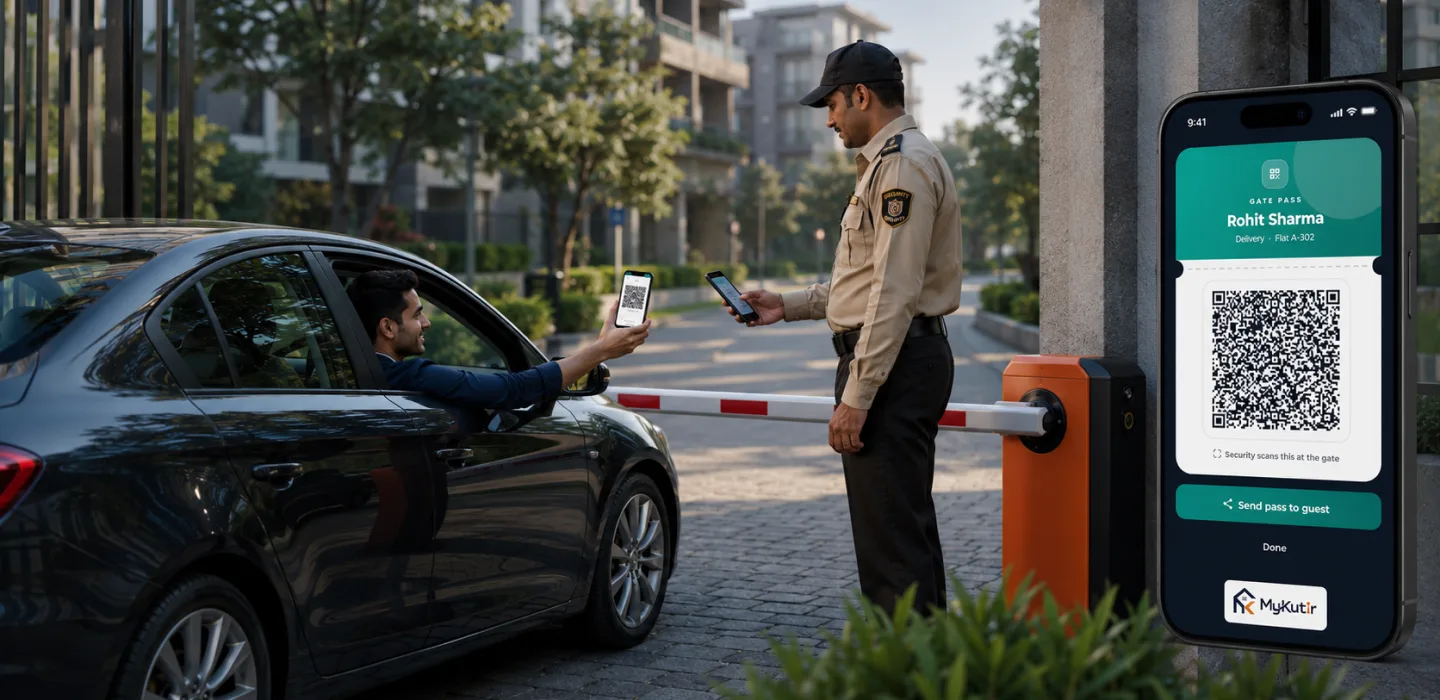
The single biggest improvement digital visitor management brings isn't at the gate at all — it's before the visitor leaves home. When a resident can add an expected guest, a recurring housemaid, a driver, or a family member to a pre-approved list ahead of time, the guard's job at the gate changes from "decide whether to let this person in" to "confirm this is who was expected." That single shift removes most of the friction, delay, and guesswork from every entry.
2. Verifying who's actually standing at the gate
For unplanned visitors, the system needs a way to get a real-time yes/no from the flat, not a guard's guess. An OTP sent to the resident's phone (commonly over WhatsApp or SMS) that the visitor or guard enters, or a direct approve/deny push notification to the resident's app, closes that loop in seconds instead of requiring the resident to walk down or the guard to phone up. It also creates a timestamped, attributable record: this specific resident approved this specific visitor at this specific time — useful the one time in a hundred that it actually matters.
3. Treating deliveries as a separate workflow, not a variant of "guest"
Courier and food deliveries are the highest-volume traffic through most gates today, and they behave completely differently from a personal guest. The sender, delivery company, and item description matter more than a name; OTP-based handoff (where the resident's OTP confirms the parcel reached the right hands, not just the right building) matters more than a photo. A system that forces every delivery through the same flow as a family guest will frustrate guards during peak delivery hours and slow down the very traffic that residents complain about most.
4. Making guards accountable without making them the villain
Visitor management isn't only about visitors. Security guard patrol accountability — whether the guard actually walked the assigned checkpoints on schedule, and whether that patrol can be verified rather than just claimed — is the other half of a working gate security setup. GPS-validated checkpoint scans during a patrol round give the committee an honest picture without requiring anyone to stand over the guard's shoulder.
The Core Building Blocks, at a Glance
| Capability | What it replaces | Why it matters |
|---|---|---|
| Resident pre-approval / whitelist (guests, staff, drivers) | Guard relying on memory or a printed "approved list" pinned at the gate | Cuts entry decisions down to a confirmation, not a judgment call |
| OTP or app-based visitor approval | Guard phoning up the flat, or waving people through on trust | Puts the approve/deny decision with the resident, in real time, with a record |
| Blacklist register shared across shifts | A single guard's memory or a note left for the next shift | A barred visitor stays barred no matter which guard is on duty |
| Separate delivery workflow with OTP handoff | Couriers logged the same way as personal guests | Matches how the majority of daily gate traffic actually behaves |
| Digital / sticker-based vehicle passes | A windshield sticker nobody can verify is genuine, or no vehicle record at all | Lets a guard confirm a vehicle belongs to a resident or approved visitor at a glance, and lets the society track parking-linked vehicles centrally |
| GPS-verified guard patrol rounds | A patrol register the guard fills in after the fact | Confirms checkpoints were physically visited, not just logged |
| Searchable visitor/delivery history | Flipping through a paper register | Turns "who visited flat 402 on the 14th" into a ten-second lookup |
An Illustrative Scenario
The following is a hypothetical, illustrative walk-through — not measured data from any specific society — meant to show how the pieces fit together in practice.
Picture a 180-flat society with two gates and three guard shifts. Before digitising, the committee's most common complaint at monthly meetings was "we don't know who's coming in and out," closely followed by residents complaining that deliveries stack up at the gate during lunch hour because the guard has to log each one individually. After moving to a pre-approval and OTP-based flow, the pattern shifts: residents add their weekly cook, driver, and expected weekend guests to a whitelist once, so those entries clear on sight. For anyone not on the list, the guard triggers an approval request and the resident gets a WhatsApp OTP or an in-app approve/deny prompt within seconds. Deliveries move through their own queue with a lighter-weight OTP handoff instead of a full guest entry. None of this eliminates gate traffic — but it changes what the guard is doing at the gate: verifying against a record, instead of guessing and hoping.
Vehicle Passes: Where Visitor Management Overlaps With Parking
Vehicle entry is where visitor management and parking management genuinely overlap, and it's often handled as an afterthought. A resident's own car ideally shouldn't go through the same approval flow as a first-time guest's car — it should be recognisable at the gate instantly, tied to the flat and the resident's allotted parking slot. Digital or sticker-based vehicle passes, scannable at the gate, solve this: a guard (or a camera-assisted scan) confirms the vehicle against a record instead of trusting a physical sticker that could be forged or expired without anyone noticing. For visiting vehicles, a time-bound digital pass tied to a specific approval keeps the same verification logic consistent, rather than having one system for people and a completely separate, informal one for cars.
What to Actually Check Before You Commit to a System
Committees evaluating options tend to focus on the demo screen and skip the operational questions that determine whether the system survives contact with a real gate on a Monday morning. Before signing anything, work through this checklist:
- Does it work when the internet is patchy? Gate hardware in basements or covered entrances often has weak connectivity. Ask specifically how entries are handled if the guard's device briefly loses signal.
- Can residents actually use it without training? If pre-approving a guest takes more than a few taps, adoption will quietly die within a month, and everyone reverts to phoning the guard directly.
- Does it separate deliveries from guests as a first-class flow, or is delivery just a category dropdown bolted onto the same guest form?
- Is the blacklist and whitelist shared across every gate and every shift, or does each guard only see what they personally entered?
- Does patrol verification use GPS or geofencing, or is it just a checkbox a guard can tick from anywhere?
- What happens to the data — is visitor history retained long enough to be useful for a dispute or police enquiry, and who can access it?
- Does it integrate with the rest of society operations — complaints, notices, parking — or does it live as an island app the guard has to switch between alongside three other tools?
A system that gets these operational questions right on day one costs the committee far less in follow-up complaints than one that looked more polished in the sales demo. MyKutir's visitor management module is built around this exact set of flows — pre-approval, OTP verification, a shared blacklist, and a separate delivery workflow — alongside GPS-checked guard patrol tracking as part of the same platform rather than a bolt-on.
Digital vs. Manual: A Straight Comparison
| Situation | Paper register / WhatsApp group coordination | Dedicated visitor management app |
|---|---|---|
| Unexpected visitor arrives | Guard calls the flat's landline or mobile and waits for pickup | OTP or push approval reaches the resident directly within seconds |
| Resident expecting a guest tomorrow | Resident has to remember to inform the guard in person or leave a note | Resident pre-approves once from the app; guard sees it automatically |
| Tracing a past visit for a dispute | Manual search through register pages by date | Searchable by name, flat, date, phone, or vehicle number in seconds |
| Barred visitor tries a different shift | Depends entirely on whether the new guard was told | Blacklist is visible to every guard on every shift automatically |
| Verifying a guard actually did rounds | Guard's own written log, unverifiable | GPS-stamped checkpoint scans confirm physical presence |
Rolling It Out Without a Revolt
The technology is rarely what makes a rollout fail. Poor sequencing is. A few practices consistently separate societies that get sustained adoption from those where the app is downloaded once and forgotten:
Start with the guards, not the residents
Guards need to be comfortable with the device and workflow before residents start relying on it, otherwise the first few weeks generate exactly the frustration you were trying to eliminate. Run the new system in parallel with the paper register for a short, clearly communicated window rather than switching cold on a single date.
Get the whitelist populated before go-live
If residents haven't pre-approved their regular staff — cooks, drivers, house help — before the switch, the gate will be flooded with manual approval requests on day one and the first impression will be that the new system is slower, not faster. A one-time nudge from the committee (a notice, a WhatsApp reminder, a QR code at the gate) to get households to add their regulars in the first week makes a disproportionate difference.
Communicate the blacklist and OTP process explicitly
Residents unfamiliar with OTP-based approval sometimes assume it's spam or a scam message and ignore it, defeating the purpose. A short notice explaining exactly what the approval message will look like and where it comes from removes that hesitation.
Review actual usage after 30 days, not just install numbers
Downloads aren't adoption. Check how many gate entries are still being handled manually versus through the system, and address the specific friction points residents or guards report rather than assuming the rollout is complete once the app is installed.
Common Mistakes Societies Make
- Buying a visitor app in isolation from everything else. When visitor logs, complaints, notices, and parking live in separate tools, nobody gets a full picture, and the committee ends up manually cross-referencing systems that should already talk to each other.
- Treating the paper register as a fallback "just in case." Keeping both running indefinitely (rather than for a short, bounded transition) guarantees guards default to whichever is faster in the moment — usually the paper one, since it needs no typing.
- Skipping guard training on the blacklist workflow. A blacklist that exists in the system but that guards were never actually shown how to check defeats its own purpose.
- Ignoring delivery volume when picking a plan or a workflow. Societies with heavy food-delivery traffic need a fast, low-friction delivery flow far more than they need an elaborate guest-approval interface; sizing the rollout around guests alone misses where most gate friction actually comes from.
- No one owning the blacklist and whitelist data over time. These lists go stale — staff change, guests stop visiting — and nobody prunes them unless a specific person or committee role is responsible for periodic review.
Key Takeaways
- A paper gate register fails structurally — no verification loop, no searchable history, no cross-shift memory — regardless of how careful the guard is.
- Real digital visitor management has four distinct jobs: pre-approval before arrival, real-time OTP/app verification at the gate, a separate lightweight flow for deliveries, and GPS-verified guard patrol accountability.
- Vehicle entry deserves its own digital/sticker pass logic, not an afterthought bolted onto guest management.
- Evaluate any system on operational questions — offline behaviour, ease of use for residents, shared blacklists across shifts — not just the demo screen.
- Rollout sequencing (guards first, whitelist populated before go-live, clear OTP communication, a 30-day usage review) determines adoption far more than the software itself.
- A visitor management module that's part of a broader society platform avoids the "island app" problem where gate data never connects to complaints, notices, or parking records.
Frequently Asked Questions
Is a digital visitor management system only useful for large societies?
No. Even a 30–40 flat society benefits from pre-approval and OTP verification, since the core problems — no verification loop, no searchable history — exist regardless of size. Larger societies simply feel the pain sooner because gate traffic volume makes a paper register unmanageable faster.
What happens if a resident doesn't respond to the OTP or approval request?
This is a policy decision each committee should set explicitly, not leave to individual guard judgement: whether an unanswered request after a defined wait time results in denial by default, a call to an alternate contact, or escalation to the committee/security desk. Whatever the platform supports, agree it in writing so guards aren't making that call ad hoc.
Do guards need smartphones, or does this require expensive gate hardware?
Most modern visitor management systems run on a tablet or smartphone at the gate rather than requiring dedicated turnstile hardware, which keeps the upfront cost far lower than a full access-control installation. Hardware-based access control (biometric gates, boom barriers) can be layered on top later if a society wants it, but it isn't a prerequisite.
How is delivery OTP different from guest OTP?
Guest OTP confirms a specific individual is approved to enter the compound. Delivery OTP typically confirms handoff — that the parcel or food order reached the correct flat or resident — and is usually a faster, lighter interaction since most couriers don't need to enter the building itself.
Can a blacklisted visitor still get past the gate?
A shared blacklist reduces this risk sharply compared to relying on one guard's memory, but it's only as good as how consistently guards check it and how promptly the committee updates it. It should be treated as one layer of gate security, not a guaranteed barrier on its own.
Does digitising visitor management replace the need for CCTV or a boom barrier?
No — it complements physical security measures rather than replacing them. Visitor management solves the record-keeping and verification problem; CCTV, boom barriers, and physical guard presence remain the physical security layer.
How long does it typically take residents to adjust to a new gate process?
This varies by society, but committees generally see the sharpest drop in confusion once the whitelist is populated and residents have received at least one real OTP approval request themselves — usually within the first couple of weeks of a well-communicated rollout, per the sequencing steps above.
Is visitor and delivery data safe to store digitally?
Any system handling visitor photos, phone numbers, and entry logs should be evaluated on how it scopes and protects that data, alongside its functional features — ask directly how visitor data is stored, who within the society can access it, and for how long it's retained.
Fixing the gate isn't really a technology problem first — it's a workflow problem that technology happens to solve well once you get the sequencing right. Whether you're evaluating your first visitor management system or replacing one that never got proper adoption, the questions above are worth working through with your committee before signing anything. You can see how these pieces fit together as part of a full society operations platform on the features page, or compare plans on pricing.